> ## Documentation Index
> Fetch the complete documentation index at: https://docs.ocient.com/llms.txt
> Use this file to discover all available pages before exploring further.
# Configure Storage Spaces
> Configure storage spaces in an Ocient System, including segment group width, parity width, and overprovisioning for fault tolerance and capacity planning.
export const Ocient = "Ocient®";
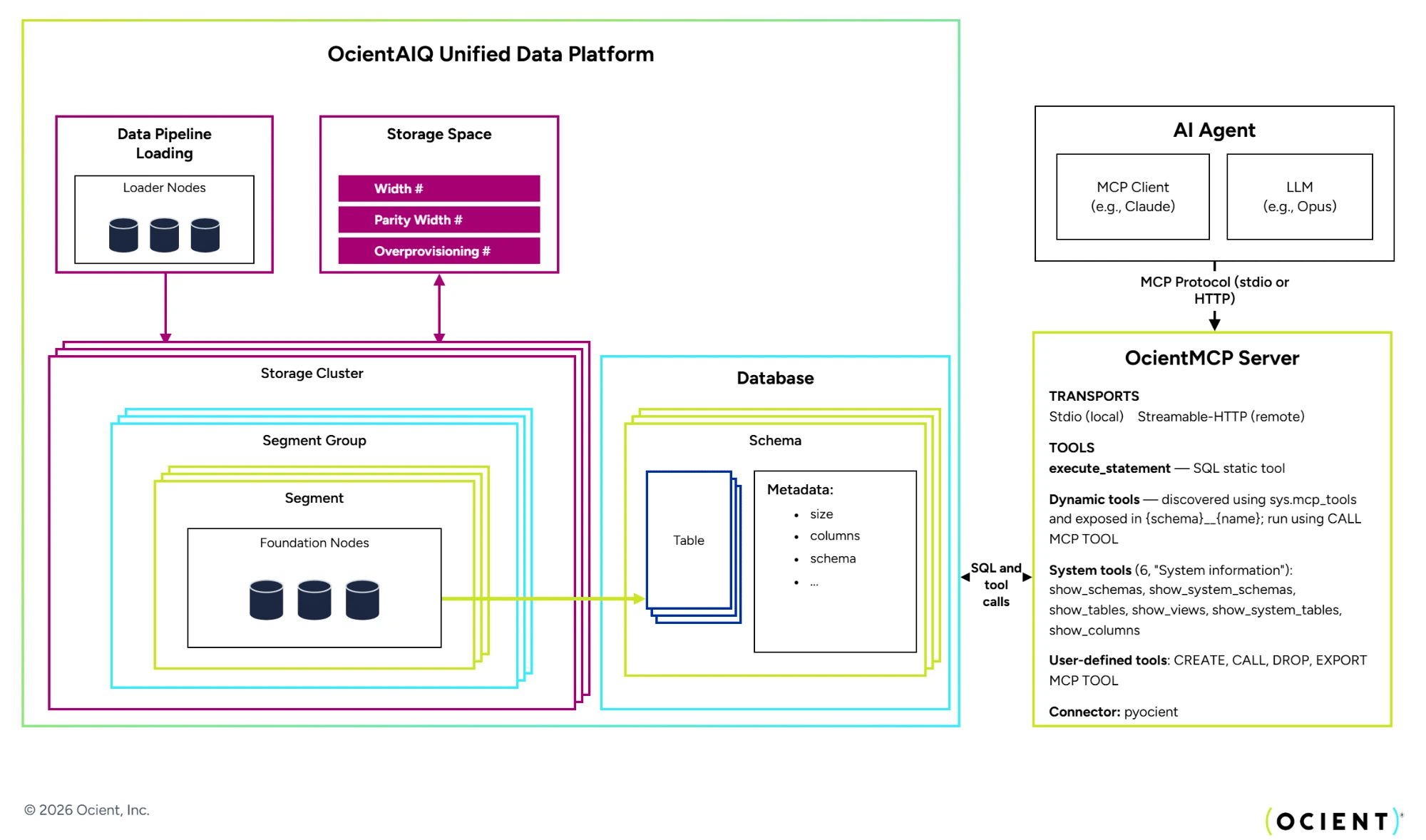
When setting up an {Ocient} System, a storage cluster represents a set of Foundation Nodes in the system. A storage space is a set of parameters that defines how data and fault tolerance are administered across the storage clusters that reference it. Multiple storage clusters can share the same storage space, but each cluster belongs to only one storage space.
Creating a storage space is an important step for launching an Ocient System that must be done after installing hardware and bootstrapping nodes, but before you start loading and querying data. To see how creating a storage space fits into the Ocient installation process, see [Ocient Application Configuration](/ocient-application-configuration).
This tutorial explains how to set up and configure storage spaces to meet the needs of your Ocient System.
 When an Ocient System starts, the system automatically creates a default system storage space for persistent metadata, such as system catalog tables. This default storage space is immutable, meaning you cannot delete or modify it.
The name of the metadata storage space is `systemStorageSpace` in the [sys.storage\_spaces](/system-catalog#sys-storage_spaces) system catalog table.
## User-Defined Storage Spaces
For storage other than metadata, you must create one or more separate storage spaces. The creation of storage spaces is necessary before loading data or performing other operations. User-defined storage spaces are configurable for extra resiliency or storage based on your system needs.
A storage space represents how the storage cluster spreads data across Foundation Nodes to balance storage and fault tolerance. In general terms, the storage cluster configuration defines how the storage cluster behaves for these attributes:
* Regular data storage operations (see [Segment Group Width](#segment-group-width))
* Query resiliency (see [Parity Width](#parity-width))
* Load resiliency (see [Overprovision](#overprovision))
You can configure a storage space to assign nodes to these job roles by using DDL statements (see [CREATE STORAGESPACE](/cluster-and-node-management#create-storagespace)).
Planning out your storage space carefully is important because you cannot change a storage space configuration after creation.
### **Segment Group Width**
Storage space parameter: `WIDTH`
The Segment Group Width determines the number of segments that comprise a segment group. Functionally, this setting defines how many Foundation Nodes perform read and write operations for a segment group.
Within a Segment Group, the system assigns each segment to a different node. Hence, the Segment Group Width cannot exceed the number of nodes in your system.
In most circumstances, Segment Group Width should comprise most of your Foundation Nodes. On system startup, the default Segment Group Width is three, which is the minimum number of nodes required for an Ocient System.
### Parity Width
Storage space parameter: `PARITY_WIDTH`
You can assign a subset of the Segment Group Width to Parity Width.
The Parity Width of a storage space determines its fault tolerance, defining the number of parity coding bits to use for each segment group. This number determines how many nodes can fail before the cluster is disabled.
Parity Width protects system querying capabilities. If any nodes fail, the system can execute and complete queries as long as the number of failed nodes is less than or equal to the Parity Width. When deployed in conjunction with overprovisioned nodes, Parity Width also provides fault tolerance for loading operations.
The `PARITY WIDTH` requires additional storage overhead, which is calculated by the formula `(PARITY WIDTH) / (SEGMENT GROUP WIDTH - PARITY WIDTH)`.
### Overprovision
The Ocient System overprovisions any Foundation Nodes in the cluster in excess of the Segment Group Width by default. These nodes can include any nodes not configured in the storage space or any nodes added later.
Overprovisioned nodes protect loading operations from node failure, although they must be used in conjunction with Parity Width. In the event of node failures, loading operations can continue as long as the number of failed nodes does not exceed the Parity Width nodes or the number of overprovisioned nodes. For this reason, providing fault tolerance for loading requires a balance of Parity Width and overprovisioned nodes.
Unlike Segment Group Width and Parity Width, you do not explicitly define a value for overprovisioning. Instead, any Foundation Nodes in the cluster in excess of the number allocated toward Segment Group Width or Parity Width become overprovisioned by default.
Avoid configuring a storage space where the Segment Group Width is significantly smaller than the total number of nodes in the cluster. Each additional overprovisioned node increases the storage metadata overhead on the system, which can degrade stability as total data volume grows. As a best practice, set the Segment Group Width to encompass most of the nodes in the cluster, reserving only a small number of nodes for overprovisioning.
### Degraded Loading
Under normal operation, loading data requires all segments in a segment group to be successfully written across the number of nodes defined by the Segment Group Width. If any target node is unavailable and there are no overprovisioned nodes to absorb the failure, loading fails entirely.
Degraded loading extends the fault tolerance of loading operations beyond what overprovisioning alone provides. When you enable degraded loading, the system can commit a segment group even if some segments cannot be written because nodes are unavailable. The system commits the segment group as long as the number of missing segments does not exceed the Parity Width. In this case, the system records the segment group using the `DAMAGED` state, and the system fills the missing segments with virtual segments that the system can reconstruct later.
This behavior allows loading to continue through node outages without requiring additional overprovisioned nodes, aligning loading resiliency more closely with query resiliency.
#### Enable or Disable Degraded Loading
Degraded loading is disabled by default in version 27.0 and earlier of the Ocient System. For a new cluster that you bootstrap in version 28.0, degraded loading is enabled by default. For a migration from a cluster with version 27.0 or later to version 28.0, degraded loading retains its previous value; it is disabled unless you explicitly enabled it before the migration.
Enable degraded loading using the `ALTER SYSTEM ALTER CONFIG SET` SQL statement.
```sql SQL theme={null}
ALTER SYSTEM ALTER CONFIG SET 'lts.allowDegradedWrites' = 'true';
```
Disable degraded loading.
```sql SQL theme={null}
ALTER SYSTEM ALTER CONFIG SET 'lts.allowDegradedWrites' = 'false';
```
Reset the parameter to its default value.
```sql SQL theme={null}
ALTER SYSTEM ALTER CONFIG RESET 'lts.allowDegradedWrites';
```
#### Rebuild Degraded Segment Groups
Segment groups written in a degraded state remain queryable because the available data and parity information are sufficient to reconstruct the missing segments at the time of query execution. However, the system does not automatically restore degraded segment groups to a fully intact state. After the unavailable nodes come back online, you must manually issue a rebuild task to restore the damaged segment groups.
```sql SQL theme={null}
CREATE TASK TYPE REBUILD;
```
Until you rebuild degraded segment groups, they have reduced fault tolerance. If additional nodes fail beyond the original missing segments, the segment group might change to the `UNAVAILABLE` state, and data loss might occur. Monitor degraded segment groups and rebuild them as soon as the system restores full cluster connectivity.
#### Monitor Degraded Segment Groups
Query the `sys.degraded_segment_groups` system catalog table to identify segment groups in a damaged state. This table shows all segment groups with the `DAMAGED` or `UNAVAILABLE` state, along with the locations of clusters and tables.
```sql SQL theme={null}
SELECT * FROM sys.degraded_segment_groups;
```
When you enable degraded loading, set up monitoring and alerting on this table to detect when segment groups require rebuilding.
#### Limitations
Degraded loading does not remove all limitations related to node outages:
* Query availability is still required for loading. Pipeline loading requires access to the system catalog tables, and CTAS and IAS operations require access to the source tables. If the number of offline nodes exceeds the Parity Width of the relevant storage space, queries fail, and loading also fails regardless of the degraded loading setting.
* Delete operations are independent of degraded loading. Deleting rows from a table requires a strict majority of nodes to be online and query availability (fewer than Parity Width unavailable nodes). In some configurations, a delete operation might fail even though loading can continue in a degraded state.
* Node transitions during loading might cause temporary failures. If a node goes offline while a CTAS or IAS query is in progress, the query might fail because the system cannot guarantee success when the storage cluster configuration changes mid-operation. Execute the query again to resolve this.
## Storage Space Configuration Examples
This section demonstrates different configurations for storage spaces. The examples each go through different scenarios for node failures to show the fault tolerance of each setup.
For information on the syntax for storage spaces, see [CREATE STORAGESPACE](/cluster-and-node-management).
### 10-Node Cluster
This example assumes you have a storage cluster of 10 Foundation Nodes.
```sql SQL theme={null}
CREATE STORAGESPACE ocient WIDTH = 10, PARITY_WIDTH = 2;
```
* The `WIDTH = 10` parameter means the system stores a segment group on 10 different nodes.
* The `PARITY_WIDTH = 2` parameter means each segment in the group contains enough parity bits to restore lost data for up to two nodes. In effect, this means parity bits comprise 20 percent of storage.
**Tolerance Scenarios**
This storage space setup has no overprovisioning, making loading operations less resilient without degraded loading. This setup results in these outcomes if nodes become disabled:
* If one node fails, loading fails, and querying can continue.
* If two nodes fail, loading fails, and querying can continue.
* If three nodes fail, loading and querying both fail.
With [degraded loading](#degraded-loading) enabled, loading can continue through node failures up to the Parity Width:
* If one node fails, loading continues with data committed in a degraded state, and querying can continue.
* If two nodes fail, loading continues with data committed in a degraded state, and querying can continue.
* If three nodes fail, loading and querying both fail.
### 12-Node Cluster
This example assumes a storage cluster of 12 Foundation Nodes.
```sql SQL theme={null}
CREATE STORAGESPACE ocient WIDTH = 10, PARITY_WIDTH = 2;
```
Note that this DDL statement is the same as the [10-Node Cluster Example](#10-node-cluster), but the cluster in this example has two additional nodes.
* The `WIDTH = 10` parameter means the system stores a segment group on 10 of the 12 nodes.
* The two remaining nodes are overprovisioned.
* The `PARITY_WIDTH = 2` parameter means each segment in the group contains enough parity bits to restore lost data for up to two nodes. In effect, this means parity bits comprise 16.6 percent of storage.
**Tolerance Scenarios**
This setup provides a level of resiliency for both querying and loading. The setup results in these outcomes if nodes become disabled:
* If one node fails, loading and querying continues.
* If two nodes fail, loading and querying continues.
* If three nodes fail, loading and querying both fail.
### 12-Node Cluster with More Parity Width
This example assumes a storage cluster of 12 Foundation Nodes with more nodes allocated to parity.
```sql SQL theme={null}
CREATE STORAGESPACE ocient WIDTH = 10, PARITY_WIDTH = 3;
```
* The `WIDTH = 10` parameter means the system stores a segment group on 10 of the 12 nodes.
* The two remaining nodes are overprovisioned.
* The `PARITY_WIDTH = 3` parameter means each segment in the group contains enough parity bits to restore lost data for up to three nodes. In effect, this means parity bits comprise 42 percent of storage.
**Tolerance Scenarios**
This setup provides resiliency for loading and especially for querying. The setup results in these outcomes if nodes become disabled:
* If one node fails, both loading and querying continue.
* If two nodes fail, both loading and querying continue.
* If three nodes fail, loading fails, and querying continues.
* If four nodes fail, both loading and querying fail.
With [degraded loading](#degraded-loading) enabled, loading resiliency extends beyond the overprovisioned node count:
* If one node fails, both loading and querying continue.
* If two nodes fail, both loading and querying continue.
* If three nodes fail, loading continues with data committed in a degraded state, and querying continues.
* If four nodes fail, loading and querying both fail.
### 15-Node Cluster
This example assumes a cluster of 15 Foundation Nodes. The configuration in this setup includes five overprovisioned nodes, exceeding the Parity Width nodes. This number of overprovisioned nodes would be inefficient in a real system and increases storage metadata overhead that can impact stability at scale. However, this example demonstrates what happens if you added extra nodes at a later time to a cluster, which the storage space would recognize as overprovisioned.
```sql SQL theme={null}
CREATE STORAGESPACE ocient WIDTH = 10, PARITY_WIDTH = 3;
```
* The `WIDTH = 10` parameter means the system stores a segment group on 10 of the 15 nodes.
* The five remaining nodes are overprovisioned.
* The `PARITY_WIDTH = 3` parameter means each segment in the group contains enough parity bits to restore lost data for up to three nodes. In effect, this means parity bits comprise 20 percent of storage.
**Tolerance Scenarios**
This setup provides resiliency for both querying and loading, but having more than three overprovisioned nodes provides no benefit because it exceeds three Parity Width nodes.
This setup results in these outcomes if nodes become disabled:
* If one node fails, loading and querying continue.
* If two nodes fail, loading and querying continue.
* If three nodes fail, loading and querying continue.
* If four nodes fail, loading and querying both fail because this breaches the Parity Width tolerance.
## Related Links
[Core Elements of an Ocient System](/core-elements-of-an-ocient-system)
[Cluster and Node Management](/cluster-and-node-management)
##
When an Ocient System starts, the system automatically creates a default system storage space for persistent metadata, such as system catalog tables. This default storage space is immutable, meaning you cannot delete or modify it.
The name of the metadata storage space is `systemStorageSpace` in the [sys.storage\_spaces](/system-catalog#sys-storage_spaces) system catalog table.
## User-Defined Storage Spaces
For storage other than metadata, you must create one or more separate storage spaces. The creation of storage spaces is necessary before loading data or performing other operations. User-defined storage spaces are configurable for extra resiliency or storage based on your system needs.
A storage space represents how the storage cluster spreads data across Foundation Nodes to balance storage and fault tolerance. In general terms, the storage cluster configuration defines how the storage cluster behaves for these attributes:
* Regular data storage operations (see [Segment Group Width](#segment-group-width))
* Query resiliency (see [Parity Width](#parity-width))
* Load resiliency (see [Overprovision](#overprovision))
You can configure a storage space to assign nodes to these job roles by using DDL statements (see [CREATE STORAGESPACE](/cluster-and-node-management#create-storagespace)).
Planning out your storage space carefully is important because you cannot change a storage space configuration after creation.
### **Segment Group Width**
Storage space parameter: `WIDTH`
The Segment Group Width determines the number of segments that comprise a segment group. Functionally, this setting defines how many Foundation Nodes perform read and write operations for a segment group.
Within a Segment Group, the system assigns each segment to a different node. Hence, the Segment Group Width cannot exceed the number of nodes in your system.
In most circumstances, Segment Group Width should comprise most of your Foundation Nodes. On system startup, the default Segment Group Width is three, which is the minimum number of nodes required for an Ocient System.
### Parity Width
Storage space parameter: `PARITY_WIDTH`
You can assign a subset of the Segment Group Width to Parity Width.
The Parity Width of a storage space determines its fault tolerance, defining the number of parity coding bits to use for each segment group. This number determines how many nodes can fail before the cluster is disabled.
Parity Width protects system querying capabilities. If any nodes fail, the system can execute and complete queries as long as the number of failed nodes is less than or equal to the Parity Width. When deployed in conjunction with overprovisioned nodes, Parity Width also provides fault tolerance for loading operations.
The `PARITY WIDTH` requires additional storage overhead, which is calculated by the formula `(PARITY WIDTH) / (SEGMENT GROUP WIDTH - PARITY WIDTH)`.
### Overprovision
The Ocient System overprovisions any Foundation Nodes in the cluster in excess of the Segment Group Width by default. These nodes can include any nodes not configured in the storage space or any nodes added later.
Overprovisioned nodes protect loading operations from node failure, although they must be used in conjunction with Parity Width. In the event of node failures, loading operations can continue as long as the number of failed nodes does not exceed the Parity Width nodes or the number of overprovisioned nodes. For this reason, providing fault tolerance for loading requires a balance of Parity Width and overprovisioned nodes.
Unlike Segment Group Width and Parity Width, you do not explicitly define a value for overprovisioning. Instead, any Foundation Nodes in the cluster in excess of the number allocated toward Segment Group Width or Parity Width become overprovisioned by default.
Avoid configuring a storage space where the Segment Group Width is significantly smaller than the total number of nodes in the cluster. Each additional overprovisioned node increases the storage metadata overhead on the system, which can degrade stability as total data volume grows. As a best practice, set the Segment Group Width to encompass most of the nodes in the cluster, reserving only a small number of nodes for overprovisioning.
### Degraded Loading
Under normal operation, loading data requires all segments in a segment group to be successfully written across the number of nodes defined by the Segment Group Width. If any target node is unavailable and there are no overprovisioned nodes to absorb the failure, loading fails entirely.
Degraded loading extends the fault tolerance of loading operations beyond what overprovisioning alone provides. When you enable degraded loading, the system can commit a segment group even if some segments cannot be written because nodes are unavailable. The system commits the segment group as long as the number of missing segments does not exceed the Parity Width. In this case, the system records the segment group using the `DAMAGED` state, and the system fills the missing segments with virtual segments that the system can reconstruct later.
This behavior allows loading to continue through node outages without requiring additional overprovisioned nodes, aligning loading resiliency more closely with query resiliency.
#### Enable or Disable Degraded Loading
Degraded loading is disabled by default in version 27.0 and earlier of the Ocient System. For a new cluster that you bootstrap in version 28.0, degraded loading is enabled by default. For a migration from a cluster with version 27.0 or later to version 28.0, degraded loading retains its previous value; it is disabled unless you explicitly enabled it before the migration.
Enable degraded loading using the `ALTER SYSTEM ALTER CONFIG SET` SQL statement.
```sql SQL theme={null}
ALTER SYSTEM ALTER CONFIG SET 'lts.allowDegradedWrites' = 'true';
```
Disable degraded loading.
```sql SQL theme={null}
ALTER SYSTEM ALTER CONFIG SET 'lts.allowDegradedWrites' = 'false';
```
Reset the parameter to its default value.
```sql SQL theme={null}
ALTER SYSTEM ALTER CONFIG RESET 'lts.allowDegradedWrites';
```
#### Rebuild Degraded Segment Groups
Segment groups written in a degraded state remain queryable because the available data and parity information are sufficient to reconstruct the missing segments at the time of query execution. However, the system does not automatically restore degraded segment groups to a fully intact state. After the unavailable nodes come back online, you must manually issue a rebuild task to restore the damaged segment groups.
```sql SQL theme={null}
CREATE TASK TYPE REBUILD;
```
Until you rebuild degraded segment groups, they have reduced fault tolerance. If additional nodes fail beyond the original missing segments, the segment group might change to the `UNAVAILABLE` state, and data loss might occur. Monitor degraded segment groups and rebuild them as soon as the system restores full cluster connectivity.
#### Monitor Degraded Segment Groups
Query the `sys.degraded_segment_groups` system catalog table to identify segment groups in a damaged state. This table shows all segment groups with the `DAMAGED` or `UNAVAILABLE` state, along with the locations of clusters and tables.
```sql SQL theme={null}
SELECT * FROM sys.degraded_segment_groups;
```
When you enable degraded loading, set up monitoring and alerting on this table to detect when segment groups require rebuilding.
#### Limitations
Degraded loading does not remove all limitations related to node outages:
* Query availability is still required for loading. Pipeline loading requires access to the system catalog tables, and CTAS and IAS operations require access to the source tables. If the number of offline nodes exceeds the Parity Width of the relevant storage space, queries fail, and loading also fails regardless of the degraded loading setting.
* Delete operations are independent of degraded loading. Deleting rows from a table requires a strict majority of nodes to be online and query availability (fewer than Parity Width unavailable nodes). In some configurations, a delete operation might fail even though loading can continue in a degraded state.
* Node transitions during loading might cause temporary failures. If a node goes offline while a CTAS or IAS query is in progress, the query might fail because the system cannot guarantee success when the storage cluster configuration changes mid-operation. Execute the query again to resolve this.
## Storage Space Configuration Examples
This section demonstrates different configurations for storage spaces. The examples each go through different scenarios for node failures to show the fault tolerance of each setup.
For information on the syntax for storage spaces, see [CREATE STORAGESPACE](/cluster-and-node-management).
### 10-Node Cluster
This example assumes you have a storage cluster of 10 Foundation Nodes.
```sql SQL theme={null}
CREATE STORAGESPACE ocient WIDTH = 10, PARITY_WIDTH = 2;
```
* The `WIDTH = 10` parameter means the system stores a segment group on 10 different nodes.
* The `PARITY_WIDTH = 2` parameter means each segment in the group contains enough parity bits to restore lost data for up to two nodes. In effect, this means parity bits comprise 20 percent of storage.
**Tolerance Scenarios**
This storage space setup has no overprovisioning, making loading operations less resilient without degraded loading. This setup results in these outcomes if nodes become disabled:
* If one node fails, loading fails, and querying can continue.
* If two nodes fail, loading fails, and querying can continue.
* If three nodes fail, loading and querying both fail.
With [degraded loading](#degraded-loading) enabled, loading can continue through node failures up to the Parity Width:
* If one node fails, loading continues with data committed in a degraded state, and querying can continue.
* If two nodes fail, loading continues with data committed in a degraded state, and querying can continue.
* If three nodes fail, loading and querying both fail.
### 12-Node Cluster
This example assumes a storage cluster of 12 Foundation Nodes.
```sql SQL theme={null}
CREATE STORAGESPACE ocient WIDTH = 10, PARITY_WIDTH = 2;
```
Note that this DDL statement is the same as the [10-Node Cluster Example](#10-node-cluster), but the cluster in this example has two additional nodes.
* The `WIDTH = 10` parameter means the system stores a segment group on 10 of the 12 nodes.
* The two remaining nodes are overprovisioned.
* The `PARITY_WIDTH = 2` parameter means each segment in the group contains enough parity bits to restore lost data for up to two nodes. In effect, this means parity bits comprise 16.6 percent of storage.
**Tolerance Scenarios**
This setup provides a level of resiliency for both querying and loading. The setup results in these outcomes if nodes become disabled:
* If one node fails, loading and querying continues.
* If two nodes fail, loading and querying continues.
* If three nodes fail, loading and querying both fail.
### 12-Node Cluster with More Parity Width
This example assumes a storage cluster of 12 Foundation Nodes with more nodes allocated to parity.
```sql SQL theme={null}
CREATE STORAGESPACE ocient WIDTH = 10, PARITY_WIDTH = 3;
```
* The `WIDTH = 10` parameter means the system stores a segment group on 10 of the 12 nodes.
* The two remaining nodes are overprovisioned.
* The `PARITY_WIDTH = 3` parameter means each segment in the group contains enough parity bits to restore lost data for up to three nodes. In effect, this means parity bits comprise 42 percent of storage.
**Tolerance Scenarios**
This setup provides resiliency for loading and especially for querying. The setup results in these outcomes if nodes become disabled:
* If one node fails, both loading and querying continue.
* If two nodes fail, both loading and querying continue.
* If three nodes fail, loading fails, and querying continues.
* If four nodes fail, both loading and querying fail.
With [degraded loading](#degraded-loading) enabled, loading resiliency extends beyond the overprovisioned node count:
* If one node fails, both loading and querying continue.
* If two nodes fail, both loading and querying continue.
* If three nodes fail, loading continues with data committed in a degraded state, and querying continues.
* If four nodes fail, loading and querying both fail.
### 15-Node Cluster
This example assumes a cluster of 15 Foundation Nodes. The configuration in this setup includes five overprovisioned nodes, exceeding the Parity Width nodes. This number of overprovisioned nodes would be inefficient in a real system and increases storage metadata overhead that can impact stability at scale. However, this example demonstrates what happens if you added extra nodes at a later time to a cluster, which the storage space would recognize as overprovisioned.
```sql SQL theme={null}
CREATE STORAGESPACE ocient WIDTH = 10, PARITY_WIDTH = 3;
```
* The `WIDTH = 10` parameter means the system stores a segment group on 10 of the 15 nodes.
* The five remaining nodes are overprovisioned.
* The `PARITY_WIDTH = 3` parameter means each segment in the group contains enough parity bits to restore lost data for up to three nodes. In effect, this means parity bits comprise 20 percent of storage.
**Tolerance Scenarios**
This setup provides resiliency for both querying and loading, but having more than three overprovisioned nodes provides no benefit because it exceeds three Parity Width nodes.
This setup results in these outcomes if nodes become disabled:
* If one node fails, loading and querying continue.
* If two nodes fail, loading and querying continue.
* If three nodes fail, loading and querying continue.
* If four nodes fail, loading and querying both fail because this breaches the Parity Width tolerance.
## Related Links
[Core Elements of an Ocient System](/core-elements-of-an-ocient-system)
[Cluster and Node Management](/cluster-and-node-management)
##