> ## Documentation Index
> Fetch the complete documentation index at: https://docs.ocient.com/llms.txt
> Use this file to discover all available pages before exploring further.
# Core Elements of an Ocient System
> Explore the core elements of an Ocient System, including SQL Nodes, Foundation Nodes, Loader Nodes, storage clusters, and the global metadata services.
export const TimeKey = "TimeKey®";
export const Python = "Python®";
export const OcientDataIntelligencePlatform = "OcientAIQ™ Unified Data Platform";
export const Ocient = "Ocient®";
export const Kafka = "Apache® Kafka®";
export const CASA = "Compute Adjacent Storage Architecture®";
An {Ocient} System combines distributed nodes, high-speed networking, and columnar storage into a single platform for large-scale data analytics. Learn about the core elements of the system: the nodes that store, load, and query data; the network flows that connect nodes; the databases, tables, and views that organize your data; and the storage concepts, such as segments and erasure coding, that protect the system from hardware failure. Also, learn how you and AI agents connect to the system to execute SQL statements.
## Ocient MCP Server
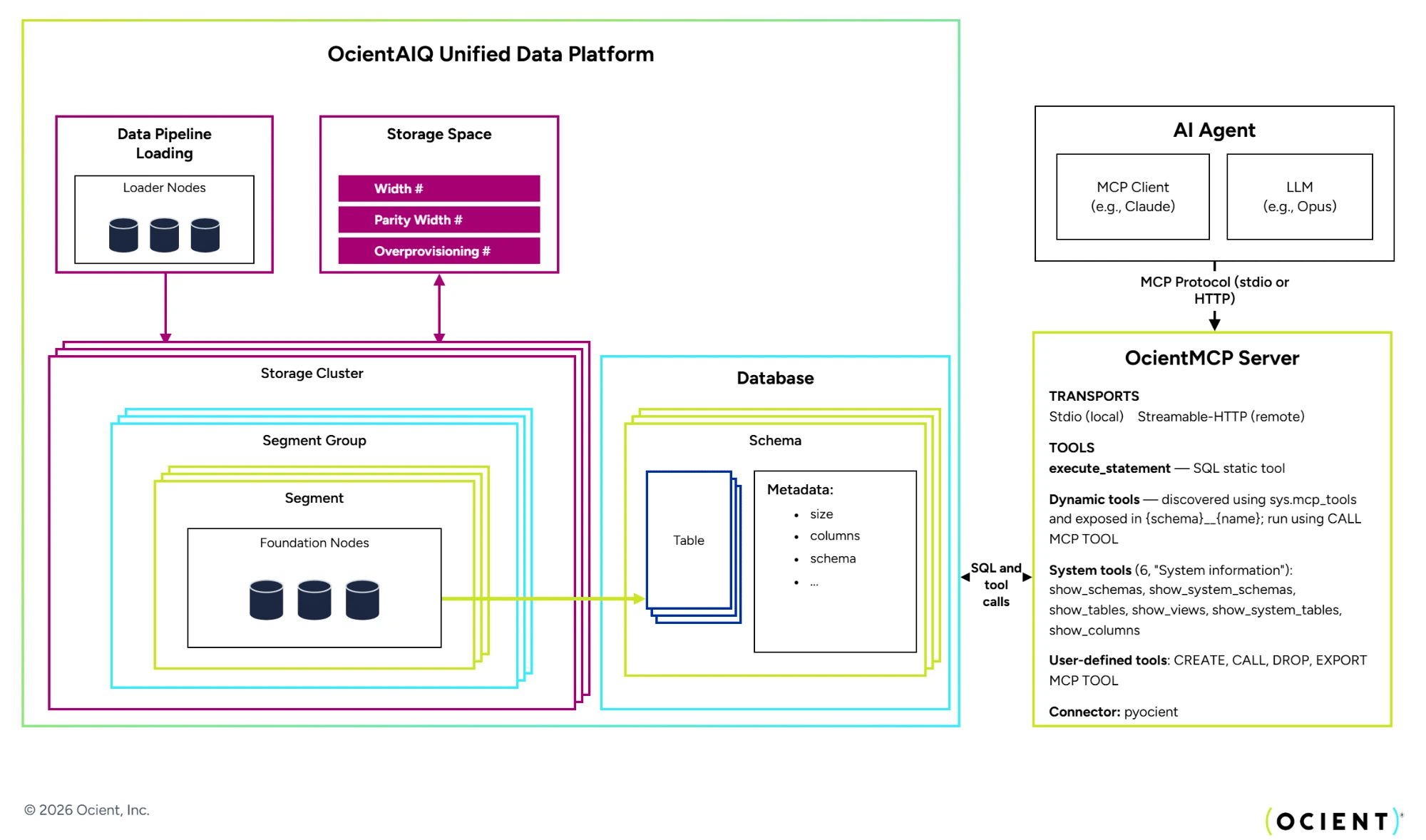
The Model Context Protocol (MCP) is an open standard that gives AI agents a consistent way to discover and invoke tools. The Ocient MCP Server implements this standard for the Ocient System. Using the Ocient MCP Server, AI agents, and AI-powered code editors can explore schemas and tables, execute SQL statements, and invoke custom tools that you define in the database using SQL.
Ocient distributes the MCP server as the {Python} package `ocientmcp`. The package works with any client that implements the MCP specification, and the server supports both local Stdio and remote Streamable HTTP deployments. The server itself defines only the `execute_statement` tool, which executes an arbitrary SQL statement against the connected Ocient System. The server discovers all other tools, including the system tools that ship with the Ocient System, by querying the `sys.mcp_tools` system catalog table. New user-defined tools that you create with the `CREATE MCP TOOL` SQL statement become available to MCP clients immediately, without a server upgrade or restart.
The Ocient System governs all MCP tools with standard access control privileges, and SQL statements that AI agents submit execute with the privileges of the connected database user. For deployment models, authentication, and the complete tool reference, see [Ocient MCP Server](/ocient-mcp-server).
## The System and Nodes
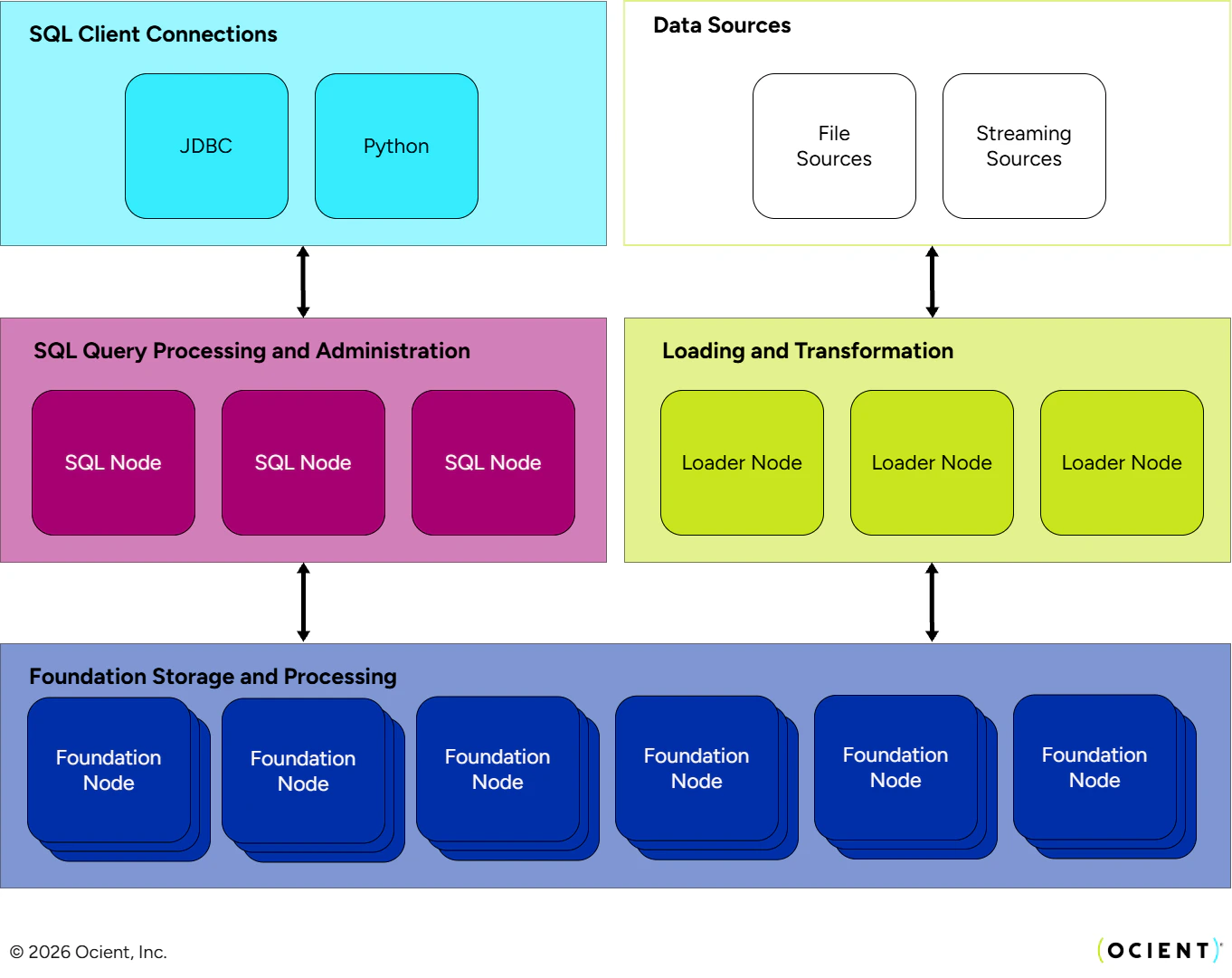
The Ocient System is the collection of all the nodes within a single environment. This architecture diagram is an example of one Ocient System. Across systems, the number of nodes can vary along with the total storage capacity. Within a single system, users can define varying numbers of databases, storage groups, users, etc.
An Ocient System is made up of a collection of distributed nodes which each play a predefined role in the data warehouse. The different roles are generally responsible for storing and analyzing data, administration, and moving data into Ocient. These nodes are connected to each other through a high-speed 100 Gbps network connection. In addition to storing user data, the data warehouse also stores metadata about the system and data for its own internal operation and recovery. This collection of nodes, their data, and the interconnection between them make up the Ocient System.
As an end user analyzing data in Ocient, you connect to this system through a JDBC or a Python-based client. AI agents connect through the Ocient MCP Server, which enables them to execute SQL statements and invoke custom tools that you define using SQL. From there, they interact with the database objects, such as tables and views. The architecture itself is abstracted from you, allowing you to focus on SQL queries and results.
While the number of nodes in an environment might vary, the inclusion of and purpose of the different roles do not. The following sections briefly describe the components in the architecture.
 ### Node Types
#### SQL Nodes
A SQL Node is responsible for receiving incoming SQL requests and parsing the statements. This node also serves as the interface for System Administrators and Database Administrators to configure and maintain an Ocient System. Administrators can connect to a SQL Node using the Ocient command-line interface or their chosen client. SQL Nodes also host the [Ocient Management UI](/ocient-management-ui), a web-based interface for monitoring system health, managing queries and pipelines, and running SQL directly in the browser.
When a SQL Node receives a query, it creates a plan for it using one of two optimization methods. After there is a plan for the query, the SQL Node distributes it to the Foundation Nodes. When the Foundation Nodes finish their processing, they return data back to the SQL Node for further processing and packaging the result set to the client. When the result set is finalized, the SQL Node returns the data to the client. Beyond the Foundation Nodes, further processing is done on the SQL Nodes to process intermediate result sets delivered by the Foundation Nodes. Depending on the query, the SQL Node is responsible for a different proportion of the overall work of the query. Common processing done here are aggregations and joins that happen across the intermediate results delivered by the Foundation Nodes.
Administrators also use DDL or DCL statements to make changes to an Ocient System. When submitted to a SQL Node, the node executes the SQL statement across the system or forwards the SQL statement to the node assigned to execute it.
#### Foundation Nodes
The Foundation Nodes store the user data in Ocient and perform the bulk of query processing.
A key architectural concept of Ocient is the {CASA}, which collocates data and processing where possible. The Foundation Node is the central element of this architectural principle. When a query is deployed to the Foundation Node, it performs as much of the query as it can with the data on the node before having to join, aggregate, or compare it to other data. It returns that result up to the SQL Node for further processing, packaging, and returning to the user.
Foundation Nodes contain the majority of the storage in an Ocient System and are also typically the largest in number.
#### Loader Nodes
Loader Nodes are responsible for extracting, transforming, indexing, and loading data ingested by Ocient from batch file sources as well as streaming data sources such as {Kafka}. You can specify the extraction source details and supply a transformation pipeline that manipulates the structured or semi-structured source data before loading it into relational form into Ocient tables.
Loader Nodes operate in a horizontal scale-out fashion allowing the loading system to scale to fit various ingestion requirements. Transparently to you as the end user, the Loader Node also manages exactly-once guarantees with data as it is loaded and converts pages into segments in the Foundation Nodes.
## Flows and Networking Between Nodes
Data and communication flows across the nodes of an Ocient System for a variety of different purposes. There are two networks that connect nodes, a 100 Gbps high speed network and a 10 Gbps network. These are used in different ways for data flows and administrative purposes.
### A Query in Ocient
When you issue a query against the database, your SQL statement moves from the JDBC client to the SQL Node. The SQL Node parses and optimizes the query before handing the plan off to the Foundation Nodes. The Foundation Nodes do the first level of processing against the data before handing the results back to the SQL Node. The SQL Node further processes the data, constructs the results, and returns them to the client. When an AI agent executes a SQL statement or invokes an MCP tool through the Ocient MCP Server, the statement follows this same flow.
* The connection between the SQL Nodes and Foundation Nodes is typically a 100 Gbps network connection. The speed of the connection between the client and the SQL Node is subject to the speed of that network (outside Ocient).
* Every Foundation Node is connected to every SQL Node.
### Administration Flows
When administrators configure or make changes to an Ocient System, they do it using DDL and DCL using a SQL client. The SQL client relays the statement to a SQL Node, which parses it into commands that the Administrator Role on the SQL Node executes. This can impact the SQL Nodes, Foundation Nodes, or Loader Nodes, depending on the type of change or operation.
* The administration flow connections with the Ocient System are 10 Gbps connections.
* Every node is connected to the SQL Nodes that perform the Administrator Role.
### Loading Flow
When the load job is defined and started, the Loader Nodes read data from the source files, stage the data, process that data, and move the data into the Foundation Nodes. Data pipelines enable you to define the data load and any corresponding transformations to ensure data is properly loaded.
* The network connections between the Loader and the Foundation Nodes are 100 Gbps.
* The Loader Nodes connect to every Foundation Node.
## Database, Tables, and Views
Similar to other databases, an {OcientDataIntelligencePlatform} is a grouping of databases, schemas, tables, views, users, and data within one Ocient System. A single system can have multiple databases and schemas. Schemas define the structure of a database and contain the definition of tables, views, and indexes. While Ocient stores data on disk in columnar format, creating and working with tables in Ocient is like any other relational database. Ocient supports a wide variety of standard SQL data types along with an expanding set of geospatial data types. You can also create user-defined MCP tools with SQL statements, which package query logic into named tools that AI agents discover and invoke through the Ocient MCP Server.
Read more about:
* [Data Definition Language (DDL) Statement Reference](/data-definition-language-ddl-statement-reference)
* [Data Query Language (DQL) Statement Reference](/data-query-language-dql-statement-reference)
* [Functions Overview](/functions-overview)
## TimeKey and Clustering Key
Each table in Ocient can contain a {TimeKey} column that is specified when defining the table. The TimeKey column is used to partition the data within the Foundation Nodes. Time partitioning is an important performance mechanism used by the OcientAIQ Unified Data Platform. Because many, if not most, queries specify some time filter for the results, time partitioning allows Ocient to quickly skip data from irrelevant times.
When defining a table, you can also specify a clustering key containing one or more of the columns to further subdivide records on disk. This allows the database to quickly find records with the same key values.
Read more in [TimeKeys and Clustering Keys](/timekeys-and-clustering-keys).
## Resilience to Hardware Failure
In order to provide reliability in the case of a hardware outage, Ocient uses erasure coding. Erasure coding is a mechanism to organize and compute parity blocks so that the system can rebuild missing data. This means that Ocient does not store redundant copies of the data for reliability. As a result, an Ocient System requires less overall storage than if it were storing one or more copies of the data for failover.
When you define your storage configuration, you specify the width of the group and the parity width. These values can vary based on how many Foundation Nodes are in the system and how resilient you want to make the Ocient System.
## Segments and Segment Groups
Segments in Ocient are storage units that contain rows and are divided into a fixed number of coding blocks with a defined size. Segments are typically sized on the order of gigabytes. You set the segment size when you define tables in Ocient. The size of the segment must be a multiple of the coding block size. The coding block is the unit of parity calculation and the smallest unit of recovery as well.
Multiple segments combine to form Segment Groups. A Segment Group has a fixed number of segments, named the width, which is the number of segments in the group. It also has a pre-defined number of parity blocks per set of data blocks for resiliency. Each segment has a defined index in the group. The Segment Group is physically stored in a storage cluster. Segment Groups can also be nested in directories named Segment Directory Groups.
When you configure an Ocient System, you need to define at least one storage space and a storage cluster. A storage cluster is a set of Foundation Nodes that references a storage space. Multiple clusters can share the same storage space, but each cluster belongs to exactly one storage space. The nodes in a cluster coordinate together to store segment groups in a reliable manner. The storage cluster has a width, which is the number of nodes in the cluster. The width of the cluster and the Segment Groups stored on it must be the same. At the storage space level, you define the width and parity width of the space. Segments and their Segment Groups are stored across these storage spaces and clusters. To learn more about erasure coding, see [Compute-Adjacent Input and Output on Large Working Sets](/compute-adjacent-input-and-output-on-large-working-sets#erasure-coding).
For details, see [Configure Storage Spaces](/configure-storage-spaces).
### Node Types
#### SQL Nodes
A SQL Node is responsible for receiving incoming SQL requests and parsing the statements. This node also serves as the interface for System Administrators and Database Administrators to configure and maintain an Ocient System. Administrators can connect to a SQL Node using the Ocient command-line interface or their chosen client. SQL Nodes also host the [Ocient Management UI](/ocient-management-ui), a web-based interface for monitoring system health, managing queries and pipelines, and running SQL directly in the browser.
When a SQL Node receives a query, it creates a plan for it using one of two optimization methods. After there is a plan for the query, the SQL Node distributes it to the Foundation Nodes. When the Foundation Nodes finish their processing, they return data back to the SQL Node for further processing and packaging the result set to the client. When the result set is finalized, the SQL Node returns the data to the client. Beyond the Foundation Nodes, further processing is done on the SQL Nodes to process intermediate result sets delivered by the Foundation Nodes. Depending on the query, the SQL Node is responsible for a different proportion of the overall work of the query. Common processing done here are aggregations and joins that happen across the intermediate results delivered by the Foundation Nodes.
Administrators also use DDL or DCL statements to make changes to an Ocient System. When submitted to a SQL Node, the node executes the SQL statement across the system or forwards the SQL statement to the node assigned to execute it.
#### Foundation Nodes
The Foundation Nodes store the user data in Ocient and perform the bulk of query processing.
A key architectural concept of Ocient is the {CASA}, which collocates data and processing where possible. The Foundation Node is the central element of this architectural principle. When a query is deployed to the Foundation Node, it performs as much of the query as it can with the data on the node before having to join, aggregate, or compare it to other data. It returns that result up to the SQL Node for further processing, packaging, and returning to the user.
Foundation Nodes contain the majority of the storage in an Ocient System and are also typically the largest in number.
#### Loader Nodes
Loader Nodes are responsible for extracting, transforming, indexing, and loading data ingested by Ocient from batch file sources as well as streaming data sources such as {Kafka}. You can specify the extraction source details and supply a transformation pipeline that manipulates the structured or semi-structured source data before loading it into relational form into Ocient tables.
Loader Nodes operate in a horizontal scale-out fashion allowing the loading system to scale to fit various ingestion requirements. Transparently to you as the end user, the Loader Node also manages exactly-once guarantees with data as it is loaded and converts pages into segments in the Foundation Nodes.
## Flows and Networking Between Nodes
Data and communication flows across the nodes of an Ocient System for a variety of different purposes. There are two networks that connect nodes, a 100 Gbps high speed network and a 10 Gbps network. These are used in different ways for data flows and administrative purposes.
### A Query in Ocient
When you issue a query against the database, your SQL statement moves from the JDBC client to the SQL Node. The SQL Node parses and optimizes the query before handing the plan off to the Foundation Nodes. The Foundation Nodes do the first level of processing against the data before handing the results back to the SQL Node. The SQL Node further processes the data, constructs the results, and returns them to the client. When an AI agent executes a SQL statement or invokes an MCP tool through the Ocient MCP Server, the statement follows this same flow.
* The connection between the SQL Nodes and Foundation Nodes is typically a 100 Gbps network connection. The speed of the connection between the client and the SQL Node is subject to the speed of that network (outside Ocient).
* Every Foundation Node is connected to every SQL Node.
### Administration Flows
When administrators configure or make changes to an Ocient System, they do it using DDL and DCL using a SQL client. The SQL client relays the statement to a SQL Node, which parses it into commands that the Administrator Role on the SQL Node executes. This can impact the SQL Nodes, Foundation Nodes, or Loader Nodes, depending on the type of change or operation.
* The administration flow connections with the Ocient System are 10 Gbps connections.
* Every node is connected to the SQL Nodes that perform the Administrator Role.
### Loading Flow
When the load job is defined and started, the Loader Nodes read data from the source files, stage the data, process that data, and move the data into the Foundation Nodes. Data pipelines enable you to define the data load and any corresponding transformations to ensure data is properly loaded.
* The network connections between the Loader and the Foundation Nodes are 100 Gbps.
* The Loader Nodes connect to every Foundation Node.
## Database, Tables, and Views
Similar to other databases, an {OcientDataIntelligencePlatform} is a grouping of databases, schemas, tables, views, users, and data within one Ocient System. A single system can have multiple databases and schemas. Schemas define the structure of a database and contain the definition of tables, views, and indexes. While Ocient stores data on disk in columnar format, creating and working with tables in Ocient is like any other relational database. Ocient supports a wide variety of standard SQL data types along with an expanding set of geospatial data types. You can also create user-defined MCP tools with SQL statements, which package query logic into named tools that AI agents discover and invoke through the Ocient MCP Server.
Read more about:
* [Data Definition Language (DDL) Statement Reference](/data-definition-language-ddl-statement-reference)
* [Data Query Language (DQL) Statement Reference](/data-query-language-dql-statement-reference)
* [Functions Overview](/functions-overview)
## TimeKey and Clustering Key
Each table in Ocient can contain a {TimeKey} column that is specified when defining the table. The TimeKey column is used to partition the data within the Foundation Nodes. Time partitioning is an important performance mechanism used by the OcientAIQ Unified Data Platform. Because many, if not most, queries specify some time filter for the results, time partitioning allows Ocient to quickly skip data from irrelevant times.
When defining a table, you can also specify a clustering key containing one or more of the columns to further subdivide records on disk. This allows the database to quickly find records with the same key values.
Read more in [TimeKeys and Clustering Keys](/timekeys-and-clustering-keys).
## Resilience to Hardware Failure
In order to provide reliability in the case of a hardware outage, Ocient uses erasure coding. Erasure coding is a mechanism to organize and compute parity blocks so that the system can rebuild missing data. This means that Ocient does not store redundant copies of the data for reliability. As a result, an Ocient System requires less overall storage than if it were storing one or more copies of the data for failover.
When you define your storage configuration, you specify the width of the group and the parity width. These values can vary based on how many Foundation Nodes are in the system and how resilient you want to make the Ocient System.
## Segments and Segment Groups
Segments in Ocient are storage units that contain rows and are divided into a fixed number of coding blocks with a defined size. Segments are typically sized on the order of gigabytes. You set the segment size when you define tables in Ocient. The size of the segment must be a multiple of the coding block size. The coding block is the unit of parity calculation and the smallest unit of recovery as well.
Multiple segments combine to form Segment Groups. A Segment Group has a fixed number of segments, named the width, which is the number of segments in the group. It also has a pre-defined number of parity blocks per set of data blocks for resiliency. Each segment has a defined index in the group. The Segment Group is physically stored in a storage cluster. Segment Groups can also be nested in directories named Segment Directory Groups.
When you configure an Ocient System, you need to define at least one storage space and a storage cluster. A storage cluster is a set of Foundation Nodes that references a storage space. Multiple clusters can share the same storage space, but each cluster belongs to exactly one storage space. The nodes in a cluster coordinate together to store segment groups in a reliable manner. The storage cluster has a width, which is the number of nodes in the cluster. The width of the cluster and the Segment Groups stored on it must be the same. At the storage space level, you define the width and parity width of the space. Segments and their Segment Groups are stored across these storage spaces and clusters. To learn more about erasure coding, see [Compute-Adjacent Input and Output on Large Working Sets](/compute-adjacent-input-and-output-on-large-working-sets#erasure-coding).
For details, see [Configure Storage Spaces](/configure-storage-spaces).
 ## Related Links
* [Ocient Architecture](/ocient-architecture)
* [Compute-Adjacent Input and Output on Large Working Sets](/compute-adjacent-input-and-output-on-large-working-sets)
* [Key Concepts](/key-concepts)
* [Ocient MCP Server](/ocient-mcp-server)
## Related Videos
* [At the Whiteboard with Ocient: Deployment Options](https://youtu.be/gkTb4dRHNKc)
* [At the Whiteboard with Ocient: Data Reliability](https://www.youtube.com/watch?v=MKR8j9kYXvg)
## Related Links
* [Ocient Architecture](/ocient-architecture)
* [Compute-Adjacent Input and Output on Large Working Sets](/compute-adjacent-input-and-output-on-large-working-sets)
* [Key Concepts](/key-concepts)
* [Ocient MCP Server](/ocient-mcp-server)
## Related Videos
* [At the Whiteboard with Ocient: Deployment Options](https://youtu.be/gkTb4dRHNKc)
* [At the Whiteboard with Ocient: Data Reliability](https://www.youtube.com/watch?v=MKR8j9kYXvg)