

PREVIEW PIPELINE SQL statement to test the creation statement and any required data transformation. Then, you can create a data pipeline using the CREATE PIPELINE statement. To manage the load, use the START PIPELINE statement to start the load and the STOP PIPELINE statement to stop it. Or, you can use the QUIESCE PIPELINE statement to stop the execution of the data pipeline gracefully. To evolve the schema of a data pipeline, you can use the ALTER PIPELINE statement. You can also rename a data pipeline using the ALTER PIPELINE RENAME statement. To see the full definition of a created pipeline, use the EXPORT PIPELINE statement. When you finish with the load, you can use the DROP PIPELINE statement to remove the data pipeline. You can create user-defined data pipeline functions using the CREATE PIPELINE FUNCTION statement and remove the function using the DROP PIPELINE FUNCTION statement. To see the full definition of a created pipeline function, use the EXPORT PIPELINE FUNCTION statement. Also, you can administer privileges for data pipelines and data pipeline functions. For details, see Data Control Language (DCL) Statement Reference.
As an alternative to writing DDL statements, you can create data pipelines using the Pipeline Builder in the Management UI. The Pipeline Builder provides a guided workflow to configure sources, formats, and transformations without writing SQL.
CREATE PIPELINE
CREATE PIPELINE defines a data pipeline that you can execute with the START PIPELINE SQL statement. Specify the type of load, data source, and data format. To replace an existing pipeline, specify the OR REPLACE keywords. For a comparison with the ALTER PIPELINE SQL statement, see Update a Pipeline.
You must have the ALTER privilege on the pipeline. For details, see Data Control Language (DCL) Statement Reference.
Syntax
SQL
Pipeline Identity and Naming
The name of a data pipeline is unique in an Ocient® System. Reference the pipeline in other SQL statements likeSTART PIPELINE, STOP PIPELINE, and DROP PIPELINE using the name of the pipeline. The SQL statement throws an error if a pipeline with the same name already exists unless you specify the IF NOT EXISTS option. You can rename a pipeline with the ALTER PIPELINE RENAME SQL statement.
SQL identifiers, including pipeline names, table names, and column aliases in the
SELECT clause, are case-insensitive. The Ocient System normalizes unquoted identifiers to lowercase. To preserve the original case of an identifier, enclose it in double quotes. For details, see Identifiers.Update a Pipeline
You can update an existing pipeline in two ways: with theOR REPLACE clause in the CREATE PIPELINE SQL statement or with the ALTER PIPELINE SQL statement. Both statements require the pipeline to be inactive, which means that it has the STOPPED, QUIESCED, COMPLETED, or FAILED status. Both statements keep the name of the pipeline. Otherwise, the statements behave differently.
The CREATE OR REPLACE PIPELINE statement replaces the pipeline by dropping the existing pipeline object and creating a new one. The new pipeline has these characteristics:
- A replaced file-based pipeline cannot perform deduplication against data that the original pipeline loaded. A replaced Kafka streaming pipeline starts its loading from the last committed offset.
- The pipeline starts with a fresh state, including target files, raft data, the durability horizon, metrics, and system catalog entries. This state does not include Kafka consumer group offsets, which the Kafka Broker stores.
- The name of the pipeline remains the same. Because the system catalog and metrics entries of the dropped pipeline persist under that name, a query by name can return entries for both the original and the new pipeline identifier. Filter by pipeline identifier to distinguish them.
ALTER PIPELINE statement updates most of the configuration and transformations of an existing pipeline. The statement performs an in-place modification that preserves the existing state of the pipeline. The statement provides these guarantees:
- No change to the pipeline identifier.
- No impact to the durability horizon, which means no data loss or duplication.
- No impact to metrics, except for querying by name after a rename.
Where the Load Resumes
The statement that you choose does not by itself determine where the load resumes. The resume point depends on the type of the source.- For a file source, such as S3, Apache® Hadoop® Distributed File System (HDFS), or a file system, the
ALTER PIPELINEstatement keeps the existing list of files and the position of the load. TheCREATE OR REPLACE PIPELINEstatement builds a new list of files, so the load starts over and reloads files that the original pipeline already loaded. - For a Kafka source, the resume point depends on the consumer group identifier, not on the statement. If the group identifier does not change, the pipeline resumes from the last offset that it committed to the Kafka Broker. If the group identifier changes, the pipeline starts according to the
auto.offset.resetpolicy, which depends on whether the new group previously committed offsets for the topic. For details, see Kafka Offsets and Consumer Group Identifiers.
ALTER PIPELINE statement for most updates, such as when you rotate credentials, tune pipeline options, or evolve the schema of the pipeline. Use the CREATE OR REPLACE PIPELINE statement when you want a new pipeline object, such as when you want to reset the durability horizon and metrics or restart a file-based load from the beginning. For details, see the ALTER PIPELINE SQL statement.
Data Pipeline Modes
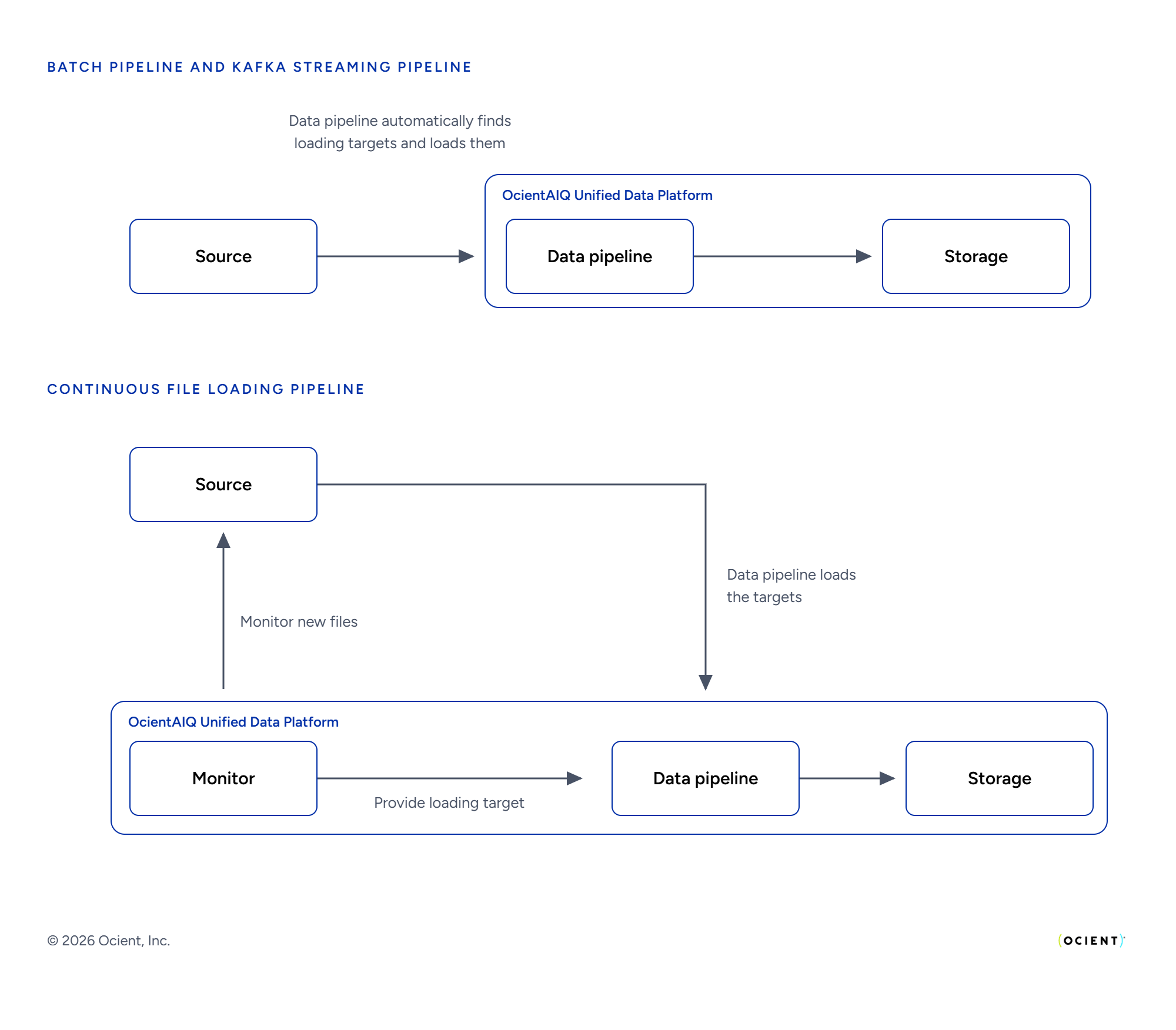
You can define pipelines in either batchBATCH, continuous CONTINUOUS, or transactional TRANSACTIONAL mode.
- File sources (e.g.,
s3,filesystem) supportBATCHandCONTINUOUSmodes. File-based loads default toBATCHmode if you do not specify this keyword. - Kafka only supports
CONTINUOUSmode. Loads with a Kafka source default toCONTINUOUSmode if you do not specify this keyword. - When you execute the
START PIPELINESQL statement using a data pipeline in theBATCHmode, the system creates a static list of files with thePENDINGstatus in thesys.pipeline_filessystem catalog table. With theCONTINUOUSmode, the monitor appends new incoming files to the list of files in thesys.pipeline_filessystem catalog table. - With the
CONTINUOUSmode, you can apply filters for the data pipeline. The system only uses files in the consumed messages if the filenames match the filters. For this mode, these options are invalid:- PREFIX
- SORT_BY
- SORT_DIRECTION
- SORT_REWRITE
- START_CREATED_TIMESTAMP
- END_CREATED_TIMESTAMP
- START_MODIFIED_TIMESTAMP
- END_MODIFIED_TIMESTAMP
- The
TRANSACTIONALmode enables the data pipeline to roll back the interim results of the load if an error occurs during load execution. The system makes all data visible only after the load completes successfully. This mode supports all options that theBATCHmode does. For details, see Transactional Data Pipelines.
Required Options
You must define certain options in every pipeline. For these options, there is no default value. Optional options need to be present only if you use specific functions. A pipeline must contain theSOURCE, EXTRACT FORMAT, and INTO table_name ... SELECT statements.
These options depend on each other: IF NOT EXISTS and OR REPLACE SQL statements are mutually exclusive.
SELECT Statement and Data Transformation
Use theINTO table_name ... SELECT SQL statement in the CREATE PIPELINE SQL statement to specify how to transform the data. The SELECT statement includes a set of one or more expressions and a target column name in the form expression as column_name. The expression part in the statement contains a source field reference (e.g., $1 or $my_field.subfield) and, optionally, the transformation function you want to apply.
If your data is nested in arrays, you can use special transformation functions, such as the EXPLODE_OUTER function, to expand the data into individual rows.
For details about data transformation and supported transformation functions, see Transform Data in Data Pipelines.
For details about data types and casting, see Data Types for Data Pipelines and Data Formats for Data Pipelines.
You can also specify metadata values, such as filename, to load in the SELECT SQL statement. For details, see Load Metadata and File-Based Partitioned Data in Data Pipelines.
This is an example of a transformation statement snippet.
SQL
WHERE clause in the form WHERE filter_expression. This expression should evaluate to a Boolean value or NULL and can include more than one filter expression. The system loads rows that contain data matching the filter criteria when the expression evaluates to true. The system does not load the rows when the expression evaluates to false or NULL. You can include any transform in the WHERE clause as in the SELECT clause.
This is an example of a filter snippet that loads order data for customers whose last name starts with the letter a. Use the COALESCE function to return only non-NULL values.
SQL
NULL and Default Value Handling
The Ocient System has specific ways to handle NULL and default values in the data pipeline. Consider this information when you prepare data to load and write theCREATE TABLE and CREATE PIPELINE SQL statements.
To load NULL values, insert the NULL value in the data. In this case, if you specify NOT NULL for the target column in the CREATE TABLE statement, the data pipeline fails to load.
If you omit a column in the SELECT SQL statement, the data pipeline loads the default value for the column. If you do not specify the default value, the pipeline loads a NULL value. If you specify NOT NULL for the target column, the data pipeline also fails to load.
You can use the DEFAULT keyword to load a default value. In this case, if the column does not have a default value, the pipeline fails to load. If the pipeline loads a NULL into a column with a specified default value, you can use COALESCE(<value>, DEFAULT) to insert the default value instead of the NULL value, where <value> is the NULL column. You can modify the load of one column at a time in this way.
This table describes the data pipeline behavior for NULL or omitted column values.
Required Privileges
You must have theCREATE PIPELINE privilege on the underlying database and the VIEW privilege on each table in the pipeline definition to execute the CREATE PIPELINE SQL statement. The table must already exist.
See the START PIPELINE SQL statement for the required privileges to execute a pipeline.
For details, see Data Control Language (DCL) Statement Reference.
Examples
Load JSON Data from Kafka
This example loads JSON data from Kafka using theCREATE PIPELINE SQL statement. Use the bootstrap server 192.168.0.1:9092 using the Kafka topic orders. Load data into the public.orders table. Specify the data to load as these JSON selectors:
- Identifier
$id - User identifier
$user_id - Product identifier
$product_id - Subtotal amount
$subtotal - Tax
$tax - Total amount
$total - Discount amount
$discount - Created time
$created_at - Quantity
$quantity
SQL
Load Delimited Data from S3
This example loads delimited data in CSV format from Amazon® Web Services℠ (AWS℠) S3. Use thehttps://s3.us-east-1.amazonaws.com endpoint with the ocient-docs bucket and path metabase_samples/csv/orders.csv. Denote path-style access using the ENABLE_PATH_STYLE_ACCESS option set to true. Specify one header line with the NUM_HEADER_LINES option. Load data into the public.orders table. Specify the data to load using the column numbers:
- Idenfier
- User identifier
- Product identifier
- Subtotal amount
- Tax
- Total amount
- Discount amount
- Created time
- Quantity
SQL
Continuous File Load of Delimited Data in CSV Files
Create a data pipeline that uses continuous file loading with delimited data in CSV files. Specify to use 32 partitions and 16 cores with thePARTITIONS and CORES options, respectively. The source is S3 with the http://endpoint.ocient.com endpoint and cs_data bucket. Specify the filter '*.csv' to find all files with a filename that matches a glob pattern without subdirectories, for example, data.csv. The system filters filenames with subdirectories such as data/data_sample.csv.
For continuous file loading, specify the MONITOR option to use the Kafka monitor. Specify the test-broker:9092 bootstrap server, cfl_kafka_ten_adtech_flat_small Kafka topic, and reset the offset to the smallest offset using the earliest value of the AUTO_OFFSET_RESET option. Set the client group identifier to 84079bf1-bdc4-4b10-ba12-41ba6b17dffe.
The format is csv with the record delimiter as the newline character \n. Load data in the public.ad_sessions table.
The SELECT statement identifies the columns to load by number. There are 39 fields in the CSV data. For each column, transform each column using cast functions. For details, see Scalar Data Conversion Functions for each function. See Date and Time Functions for the TO_TIMESTAMP function.
SQL
Continuous File Load of CSV Files with a Unique Message Format
Create a data pipeline that uses continuous file loading when the Kafka monitor consumes messages that do not use the default message format. By default, the monitor expects each message to match the structure of ans3:ObjectCreated:* event. When your messages use a different structure, specify the MESSAGE syntax to map a JSON selector to the filename, the last modification timestamp, and the file size of each incoming file. For details about the event structure, see S3 Notification Content Structure.
In this example, the monitor consumes messages in this JSON format.
JSON
PARTITIONS and CORES options, respectively. The source is S3 with the http://endpoint.ocient.com/ endpoint and cs_data bucket. Specify the filter 'adtech_flat/small/1576515918-0000049496*' to load only the files in the adtech_flat/small directory with a filename that begins with 1576515918-0000049496.
For continuous file loading, specify the MONITOR option to use the Kafka monitor with these options:
BOOTSTRAP_SERVERS— The three Kafka brokerstest-broker1:9092,test-broker2:9092, andtest-broker3:9092.TOPIC— Thecfl_kafkaKafka topic.AUTO_OFFSET_RESET— Theearliestvalue, which resets the offset to the smallest offset.POLLING_INTERVAL— The interval of 10 seconds at which the monitor consumes the event topic.BATCH— A maximum of 10 pending files, a wait of 15 seconds before the system starts a batch, and a lookback period of 10 hours for file deduplication.CONSUMER— A maximum of 10 messages for each poll and an operation timeout of 1000 milliseconds.MESSAGE— The$filename,$timestamp, and$sizeJSON selectors that match the fields in the incoming message.GROUP_ID— The client group identifierci__5aaa443e618a.
csv. Load data in the public.ad_sessions table.
The SELECT statement identifies the columns to load by number. For each column, transform each column using cast functions. The NULL_IF function loads a NULL value when the source field contains an empty string. For details, see Scalar Data Conversion Functions for each cast function. See Date and Time Functions for the TO_TIMESTAMP function and Other Functions and Expressions for the NULL_IF function.
SQL
Transactional Load of Delimited Data in CSV Files
Create a data pipeline that uses transactional file loading with delimited data in CSV files. The source is S3 with thehttp://endpoint.ocient.com endpoint and cs_data bucket. Specify the filter '*.csv' to find all files with a filename that matches a glob pattern without subdirectories, for example, data.csv. The system filters filenames with subdirectories such as data/data_sample.csv.
The format is csv. Load data in the public.ad_sessions table.
The SELECT statement identifies the columns to load by number. For each column, transform each column using cast functions. For details, see Scalar Data Conversion Functions for each function. See Date and Time Functions for the TO_TIMESTAMP function.
SQL
SOURCE Options
File-Based Source Options
Options that apply to both theS3, FILESYSTEM, and HDFS sources.
S3 Source Options
You can apply these options to data sources of theSOURCE S3 type, which include S3 and S3-compatible services.
S3 Credentials Hierarchy
The S3 source configuration supports this hierarchy to obtain S3 credentials:
- Level 1: Data pipeline configuration (set by using the
ACCESS_KEY_IDandSECRET_ACCESS_KEYoptions) - Level 2: AWS SDK Default Credential Provider Chain (set by using the instructions provided in the web page)
- Level 3: Anonymous access (set by default)
You can choose the level to store the credentials, where Level 1 is the highest. Higher levels take precedence for credential storage.
FILESYSTEM Source Options
No options exist specific to the file system source (SOURCE FILESYSTEM) except for general file-based source options.
Files must be located in these directories:
- Always allowed:
/tmpconfig streamloader.extractorEngineParameters.tempDir(default is/var/opt/ocient/tmp)config streamloader.extractorEngineParameters.configurationOption.filesystem.access.directories- The default is empty.
- You can specify a list of directories.
- Not allowed:
/etc/bin/sbin/lib/lib64/usr/boot/proc/sys/run/root/var/lib/var/log/var/run/var/cache
When you load data using
SOURCE FILESYSTEM, the files must be addressable from all of your Loader Nodes. The Ocient System uses the specified path in the pipeline PREFIX and FILTER options to select the files to load.A shared view of the files you want to load must be available to all Loader Nodes involved in a pipeline. For example, you can use a Network File System (NFS) mount available to all Loader Nodes at a common path on each node.CREATE PIPELINE SQL statement snippet contains a FILESYSTEM source and filters to all CSV files in the /tmp/sample-data/ directory on each of the Loader Nodes.
SQL
HDFS Source Options
You can specify these options for HDFS data sources (SOURCE HDFS).
HDFS sources support the same file formats as FILESYSTEM and S3 sources, including delimited, csv, json, binary, asn.1, avro, parquet, and xml.
For advanced options, see Data Pipeline Load of JSON Data from HDFS.
The HDFS source also supports Kerberos authentication using a keytab file or a delegation token. For details, see Kerberos Authentication for HDFS Sources. For examples, see “Load Data from HDFS with Kerberos Keytab Authentication” and “Load Data from HDFS with Kerberos Delegation Token Authentication” below.
Examples
These examples show different ways to use Kerberos authentication for loading HDFS source data.
Load Data from HDFS with Kerberos Keytab Authentication
This example loads GZIP-compressed CSV files from an HDFS source that requires Kerberos authentication with a keytab file. The pipeline uses the
hdfs-host:9000 endpoint and filters on the path /data/scores/2026/*.csv.gz. Configure Kerberos authentication by specifying these options:
- The
PRINCIPALoption with the Kerberos principalloaduser@EXAMPLE.COM. - The
KEYTAB_FILEoption with the path of a keytab file that exists on all Loader Nodes. - The
CONFIGoption with thedfs.namenode.kerberos.principalanddfs.data.transfer.protectionconfiguration properties so that the loading process can identify the Kerberos principal of the namenode server.
public.student_scores table. The SELECT statement identifies the columns to load by number. For details about Kerberos authentication, see Kerberos Authentication for HDFS Sources.
SQL
TOKEN option with the delegation token string. The loading process renews the token every five minutes as specified by the RENEW_INTERVAL option. For details about Kerberos authentication, see Kerberos Authentication for HDFS Sources.
SQL
KAFKA Source Options
You can apply these options to Kafka data sources (SOURCE KAFKA).
For compression, you do not need to specify a compression option in Kafka streaming pipelines, because the Ocient System handles the compression type automatically. Records produced to the Kafka broker with a
compression.type setting or with the compression.type set on the topic automatically decompress when the loading process consumes the records. The loading process uses built-in headers in Kafka to determine the required decompression during extraction.For the consumer configuration, to create a secure connection from the Kafka consumer to a Kafka Broker, set the
"security.protocol" key along with any SSL or SASL keys.If a certificate file is required, you must add it to the truststore used by the JVM® on all Loader Nodes. The truststore path must be identical on all Loader Nodes. The Kafka configuration can reference this truststore path.If you specify the
ssl.certificate.location or ssl.ca.location consumer configuration, you must specify both of these configurations. Otherwise, the system throws an error. For example: CONFIG '{"auto.offset.reset": "earliest","ssl.certificate.location":"/etc/blab/file1.txt","ssl.ca.location":"/etc/blab/file2.txt"}'Continuous File Loading Source Options
Specify these options for data pipelines that useFILESYSTEM or S3 sources with the CONTINUOUS mode. For a Kafka source, do not use these options.
You are responsible for setting up, maintaining, and publishing messages to the external tooling (e.g., Kafka, Amazon® SQS). The data pipeline does not generate messages automatically.
SQS Monitor Options
Use these options when you use
MONITOR sqs for SQS.
Kafka Monitor Options
Use these options when you use
MONITOR kafka for Kafka.
The same Kafka
CONFIG option override considerations apply. For details, see KAFKA Source Options.LOOKUP Options
You can optionally look up data in a table from an external database. You can include this table in theSELECT statement of the CREATE PIPELINE SQL statement and perform join operations on its columns. To use the LOOKUP keyword, specify the external source name lookup_source.
You can look up data in multiple external databases. In this case, use the LOOKUP keyword with the source name and corresponding options for each database.
You must provide the appropriate JDBC JAR file for the JDBC connection to external databases. For tables in the Ocient System, this JAR file is not needed.
EXTRACT Options
General Extract Options
You can specify these options on any of the allowedFORMAT types.
For ASN.1, Apache® Avro™, and Parquet extract options, the SCHEMA option is a
MAP type with a NULL default value. This option is optionally specified depending on the format. SCHEMA specifies the syntax of options for schema retrieval.ASN.1 Extract Options
You can specify these options for ASN.1 data record extraction (FORMAT ASN.1).
For details about ASN.1-formatted data, see Load ASN.1 Data.
Avro Extract Options
You can specify these options for Avro data record extraction. TheSCHEMA options are all optional for object container files (OCF).
For Kafka streaming pipelines, you must specify a schema configuration that includes either the URL option or the INLINE option (for manual specification), but not both.
For file-based loads, the system can infer the schema from the file structure, so a schema configuration is not required. However, you can specify the schema configuration with:
- Either the
INLINEoption or theINFER_FROMoption, but not both of these options - Neither the
INLINEnor theINFER_FROMoptions
BINARY Extract Options
You can apply these options to binary data record extraction (FORMAT BINARY).
For details about BINARY-formatted data, see Load Binary Data.
The general option
CHARSET_NAME has a different default value for FORMAT BINARY.The Ocient System trims the default padding character of a space from the end of the text data in binary data.
Delimited and CSV Extract Options
You can specify these options for delimited and CSV format data record extraction (FORMAT DELIMITED or FORMAT CSV data formats, which are aliases).
For details about working with delimited and CSV data, see Load Delimited and CSV Data.
JSON Extract Options
No options exist for JSON data record extraction (FORMAT JSON).
For details about JSON-formatted data, see Load JSON Data.
PARQUET Extract Options
You can specify these options for Parquet data record extraction (FORMAT ``PARQUET).
For details about Parquet-formatted data, see Load Parquet Data.
You can extract Parquet files from S3, FILESYSTEM, and HDFS sources.
XML Extract Options
No options exist for the XML format extraction (FORMAT XML).
For details about XML-formatted data, see Load XML Data.
Bad Data Targets
Bad data represents records that the Ocient System could not load due to errors in the transformations or invalid data in the source records. You can provide options for a bad data target that the Ocient System uses during pipeline execution to capture the records that are not loaded. The original bytes that the pipeline tried to load are captured in the bad data target along with the metadata about the error, such as the error message or source. Kafka is the only supported bad data target.Kafka Bad Data Target
When you use Kafka as a bad data target, the Ocient System produces the original bytes of the source record into the Kafka topic of your choice. The Ocient System includes the metadata about the record in the header of the record as it is sent to Kafka. You can configure the Kafka topic on your Kafka Brokers using the retention and partition settings of your choice. You can use a Kafka bad data target with any data source (e.g., S3, local file, and so on). Example This exampleCREATE PIPELINE SQL statement snippet contains a bad data target definition using the BAD_DATA_TARGET option.
SQL
Kafka Bad Data Target Options
Advanced Pipeline Tuning Options
You can use pipeline tuning options to control the parallelism or batching dynamics of your pipelines. This tuning can throttle the resources used on a pipeline or increase parallel processing across Loader Nodes. These options are advanced settings that might require a detailed understanding of the underlying mechanics of the loading infrastructure in the Ocient System to employ. Due to the inherent nature of each source type, the behavior of these options can differ between file-based and Kafka-based loads. All these options are optional. | Option Key | Default | Data Type | Option Configurability | Description | | --- | --- | --- | --- | --- | --- | | CORES | The maximum number of CPU cores available on each Loader Node. | INTEGER | Yes | Maximum number of processing threads that the Ocient System uses during execution on each Loader Node. The system creates this number of threads on each Loader Node.The Ocient System automatically determines the default value by finding the number of cores of a Loader Node. You can use this option for performance tuning.
The calculation for maximum parallelism of a pipeline is:
number_of_loaders * CORES. About Kafka Partitions and Parallelism
For Kafka streaming pipelines, this option determines the number of Kafka Consumers created on each Loader Node.
For Kafka Pipelines, the recommendation is that
number_of_loaders * CORES equals the number of Kafka topic partitions. If this number exceeds the number of Kafka topic partitions, the work might spread unevenly across Loader Nodes.
If this number is less than the number of Kafka topic partitions, some Kafka Consumers might receive uneven amounts of work. In this case, use a value for
number_of_loaders * CORES that is an even divisor of the number of Kafka topic partitions to avoid a skew in the rates of processing across partitions. Value Range: 1 to 1,024. | | PARTITIONS | Equal to the value of CORES. | INTEGER | Yes | Specifies the number of partitions over which to split the file list. Not applicable to Kafka streaming pipelines.
The Ocient System automatically sets a default value based on the configured value for the
CORES option. You can use this option for performance tuning. The number of partitions determines how many buckets of work the Ocient System generates for each batch of files processed on a Loader Node. The pipeline processes this number of partitions in parallel using the specified number of cores.
If you specify fewer partitions than cores, some cores are not fully utilized, and resources are wasted. If you specify more partitions than cores, the Ocient System divides partitions in a round-robin fashion over the available cores.
Value Range: 1 to 2,048. | | BATCH_SIZE | A dynamic value, determined by the Ocient System for each pipeline to maximize performance. | INTEGER | Yes | Number of rows in the batch to load at one time.
The Ocient System automatically calculates a dynamic value depending on the table columns and the utilization of internal buffers to transfer records to the database backend. You can use this option to turn off the dynamic adjustments for performance tuning.
⚠️ Only change this setting in rare cases where loading performance is slower than expected, and you have a large record size. If this setting is improperly set, pipelines might fail with out-of-memory exceptions.
You can configure the default value (for the batch payload target) using a SQL statement such as:
ALTER SYSTEM ALTER CONFIG SET 'streamloader.extractorEngineParameters.configurationOption.osc.batch.payload.target' '65536' Value Range: 1 to 1,073,741,824. | | RECORD_NUMBER_FORMAT | For file loads that do not use the EXPLODE_OUTER function, the default is `[19, 45, 0]`.
For Kafka streaming pipelines that do not use the `EXPLODE_OUTER` function, the default is `[0, 64, 0]`.
For loads that use the `EXPLODE_OUTER` function, the default is the specified load-type-specific default value with 13 subtracted from the record index bits. The system adds these bits to the bits for rows within a record.
For example, the default for file loads that use this function is `[19, 32, 13]`. | ARRAY | Yes | The 64-bit record number for each record of the load. This number uniquely identifies a row within its partition.
The format is an array with three values in the format`[, , ]`
The file index bits “ value is the number of bits used to represent the file index within a partition.
The record index bits “ value is the number of bits used to represent the record index within a file.
The rows per record index bits “ is the number of bits used to represent the row within a record. The system uses this value with the `EXPLODE_OUTER` function.
These three values must sum to 64.
**Example**
`RECORD_NUMBER_FORMAT= [10, 54, 0]`
Set the number of file index bits to `10` and the number of record index bits to `54`, allowing up to 2^10 files and 2^54 records per file. The system does not support the `EXPLODE_OUTER` function in this configuration because the rows per record index bits are `0`. | |
DROP PIPELINE
DROP PIPELINE removes an existing pipeline in the current database. You cannot remove a pipeline that is in the RUNNING or QUIESCING status. To remove a pipeline that is running, first execute the STOP PIPELINE or QUIESCE PIPELINE SQL statement.
You must have the DROP privilege on the pipeline to execute this SQL statement. For details, see Data Control Language (DCL) Statement Reference.
Syntax
SQL
Examples
Remove Existing Data Pipeline
Remove an existing pipeline named
ad_data_pipeline.
SQL
ad_data_pipeline or return a warning if the Ocient System does not find the pipeline in the database.
SQL
PREVIEW PIPELINE
PREVIEW PIPELINE enables you to view the results of loading data for a specific CREATE PIPELINE SQL statement without creating a whole data pipeline and without storing those results in the target table. Using this SQL statement, you can iterate quickly and modify the syntax as needed to achieve your expected results. After you confirm your expected results, you can use the same syntax in the body of the CREATE PIPELINE statement with the appropriate source.
A table must exist in the database to serve as the target of your PREVIEW PIPELINE statement. This table ensures the pipeline matches the column types of the target table. However, the execution of this statement does not load data into the target table.
Preview Sources
TheSOURCE INLINE source type is available only for the PREVIEW PIPELINE SQL statement. You cannot create a data pipeline with inline source data. The inline source data limit is 1,000 rows.
Other source types defined in the CREATE PIPELINE statement, S3, KAFKA, and FILESYSTEM, are compatible with the PREVIEW PIPELINE statement. The extract options vary by the source type to mirror the CREATE PIPELINE statement. The database returns 10 records by default.
Preview Error Handling
Pipeline-level errors cause thePREVIEW PIPELINE SQL statement to fail. The Ocient System returns an error and no result set. However, the Ocient System accumulates record-level errors that occur during the execution of this statement in a single warning that the system returns along with the result set. Each line of the warning describes a record-level error in human-readable form or as a JSON blob, depending on the value of the SHOW_ERRORS_AS_JSON option. Rows or columns that encounter record-level errors have NULL values in the result set.
Preview Limitations
Limitations of this SQL statement are:- Before executing a
PREVIEW PIPELINESQL statement, you must create a table for the Ocient System to have context for the preview. - The maximum number of rows a
PREVIEW PIPELINESQL statement can return is 1,000 rows. - The
COLUMN_DEFAULT_IF_NULLoption from theCREATE PIPELINESQL statement has no effect on thePREVIEW PIPELINESQL statement. - The
PREVIEW PIPELINESQL statement does not honor the assignment of a service class based on text matching. - These source options are not supported:
START_FILENAMEEND_FILENAME
- When you execute two duplicate
PREVIEW PIPELINEstatements for a specific Kafka topic, the two statements share a consumer group. If the topic is small, one or both of the result sets might only be a partial result. - For multiple tables, you can preview only one table at a time. You must specify the name of the table you want to preview using the
FORkeyword. - Previewing a continuous data pipeline is not supported.
SQL
Though this syntax shows the CSV format, you can also use the
PREVIEW PIPELINE statement with the other formats.
SQL Statement Options
You must specify at least one column name in the
SELECT part of the syntax. The name of the specified column must match the name of the column in the created table. The number of columns in the SELECT part can be less than those in the created table. With this mismatch, the PREVIEW PIPELINE SQL statement might succeed even if the CREATE PIPELINE statement fails.CREATE PIPELINE SQL statement options in CREATE PIPELINE.
Examples
Preview Pipeline Using CSV Format
Preview the load of two rows of data. First, create a table to serve as the context for the load. The previewload table contains three columns with these data types: string, integer, and Boolean.
SQL
testpipeline with this data: 'hello,2,true|bye,3,false'. Specify the CSV extract format, | record delimiter, and the , field delimiter. Load the data without transformation.
SQL
Output
Text
previewload table.
SQL
previewload table contains three columns with these data types: string, integer, and Boolean.
SQL
testpipeline with this data: 'hello\tworld,2,true|bye\tworld,3,false'. Specify the CSV extract format, | record delimiter, and , field delimiter. Load the data without transformation. In this case, the data contains the special character \t. You must escape the character by using the escape sequence e.
SQL
Output
Text
previewload table.
SQL
previewload table contains three string columns.
SQL
testpipeline with this data: 'hello,world|bye,world'. Specify the CSV extract format, | record delimiter, and the , field delimiter. Load the data with a transformation to concatenate the two strings and return the result in the third column.
SQL
Output
Text
previewload table.
SQL
previewload table with these columns:
id— Non-NULL integersalut— Non-NULL stringname— Non-NULL stringsurname— Non-NULL stringzipcode— Non-NULL integerage— Non-NULL integerrank— Non-NULL integer
SQL
test_small_kafka_simple_csv. Specify the ddl_csv topic. Indicate that the Kafka consumer should not write its durably-made record offsets to the Kafka Broker by using the WRITE_OFFSETS option set to false. Specify the bootstrap server as servername:0000 and configuration options as "auto.offset.reset": "earliest" by using the BOOTSTRAP_SERVERS and CONFIG options, respectively. Limit the returned results to three rows by using the LIMIT option. Specify the CSV extract format and \n record delimiter by using the FORMAT and RECORD_DELIMITER extract options, respectively.
SQL
Text
QUIESCE PIPELINE
QUIESCE PIPELINE stops the execution of the specified data pipeline gracefully. When you execute this SQL statement, the pipeline transitions to the QUIESCING status. The Ocient System creates no new work units and waits for all in-flight work units to finish. After the in-flight work finishes, the pipeline transitions to the QUIESCED status and the statement returns.
A quiesced pipeline provides a clean breakpoint with no partially loaded files:
- For a batch pipeline, every file that belongs to the quiesced pipeline in the
sys.pipeline_filessystem catalog table is in theLOADED,FAILED,LOADED_WITH_ERRORS, orPENDINGstatus. - For continuous pipelines with monitors and Kafka streaming pipelines, the pipeline commits all consumed messages to the external sources and stops consuming before it transitions to the
QUIESCEDstatus. Every file that belongs to the quiesced pipeline in thesys.pipeline_filessystem catalog table is in theLOADED,FAILED,LOADED_WITH_ERRORS, orPENDINGstatus.
ALTER PIPELINE, DROP PIPELINE, or START PIPELINE SQL statement on a quiesced pipeline without the risk of missing or duplicate data.
In contrast, the STOP PIPELINE SQL statement stops the pipeline as soon as possible and can leave files in intermediate statuses. For details, see STOP PIPELINE.
The QUIESCE PIPELINE SQL statement has these behaviors:
- You can quiesce a pipeline only in the
RUNNINGstatus. You cannot quiesce a pipeline in theCOMPLETED,FAILED,STOPPED, orQUIESCEDstatus, or a pipeline that has never started. - Consecutive
QUIESCE PIPELINEstatements on the same pipeline are idempotent. Only the first statement signals the pipeline to shut down. - To interrupt a graceful stop that takes too long, execute the
STOP PIPELINESQL statement on the pipeline in theQUIESCINGstatus. The Ocient System interrupts the drain and stops the pipeline as soon as possible. - If the in-flight work units reach the error limit of the pipeline during the quiesce, the pipeline transitions to the
FAILEDstatus. - The
QUIESCE PIPELINESQL statement returns after the pipeline reaches one of the inactive statuses:STOPPED,QUIESCED,COMPLETED, orFAILED. - Kafka streaming pipelines that set the
VERSIONsource option to1do not support theQUIESCE PIPELINESQL statement. To stop these pipelines, use theSTOP PIPELINEstatement.
QUIESCING and QUIESCED events in the sys.pipeline_events system catalog table. You can monitor the status of the pipeline in the information_schema.pipeline_status view.
Required Privileges
You must have the EXECUTE privilege on the pipeline to execute this SQL statement. For details, see Data Control Language (DCL) Statement Reference.
Syntax
SQL
Example
Quiesce an existing pipeline named
ad_data_pipeline.
SQL
QUIESCED status. To resume the pipeline, execute the START PIPELINE SQL statement.
START PIPELINE
START PIPELINE begins the execution of the specified data pipeline that extracts data and loads it into the target tables specified by the CREATE PIPELINE SQL statement. You can execute START PIPELINE when the pipeline is in the STOPPED, FAILED, or QUIESCED status. A newly created pipeline has the STOPPED status. The pipeline transitions to the QUEUED status while it waits for the Ocient System to schedule it, and then to the RUNNING status after it begins to process data.
When you execute the START PIPELINE SQL statement, the Ocient System creates a static list of files in the sys.pipeline_files system catalog table and marks them with the PENDING status. After the system assigns a file to an underlying task, the system marks the file as QUEUED. After the system verifies that the file exists, the system marks the file as LOADING to signify that a Loader Node has started reading the source data. Finally, upon successfully loading the file, the system transitions the status of the file to the terminal status LOADED.
A Kafka streaming pipeline never enters the COMPLETED state in the information_schema.pipeline_status view. Instead, the pipeline remains running after you start the pipeline until you stop it or the pipeline reaches the specified error limit using the ERROR LIMIT option.
You must have the EXECUTE privilege on the pipeline and the INSERT privilege on any table that is a target in the pipeline. For details, see Data Control Language (DCL) Statement Reference.
Syntax
SQL
SQL Statement Options
For the query to execute successfully, the specified node names must identify nodes that have:
ACTIVEoperational statusstreamloaderrole
When you execute the
START PIPELINE SQL statement, the Ocient System creates a static list of files only for batch pipelines and a dynamic list for continuous pipelines in the sys.pipeline_files system catalog table.ad_data_pipeline with default settings.
SQL
ad_data_pipeline with error tolerance (tolerate 10 errors before aborting the pipeline). For details about error tolerance, see Error Tolerance in Data Pipelines.
SQL
Data pipelines log a message for each pipeline error to the
sys.pipeline_errors system catalog table, even if you do not specify the ERROR option. Use BAD_DATA_TARGET settings to capture the original source data.ad_data_pipeline using the Loader Node named stream-loader1.
SQL
STOP PIPELINE
STOP PIPELINE stops the execution of the pipeline and its associated tasks as soon as possible. The Ocient System interrupts in-flight work, and the pipeline transitions to the STOPPED status. Files can remain in intermediate statuses, such as LOADING or QUEUED. To stop a pipeline gracefully with no partially loaded files, use the QUIESCE PIPELINE SQL statement instead. You can also execute STOP PIPELINE on a pipeline in the QUIESCING status to interrupt a graceful stop.
After you stop a pipeline, you can execute the START PIPELINE SQL statement on the pipeline to run the pipeline again. Regardless, the load deduplicates any records previously loaded in the same pipeline.
You must have the EXECUTE privilege on the pipeline to execute this SQL statement. For details, see Data Control Language (DCL) Statement Reference.
Syntax
SQL
Example
Stop an existing pipeline named
ad_data_pipeline.
SQL
sys.tasks system catalog table and see the status of the child tasks in the sys.subtasks system catalog table.
ALTER PIPELINE
ALTER PIPELINE updates the configuration and transformations of an existing data pipeline. The statement performs an in-place modification that preserves the existing state of the pipeline, including its identifier, durability horizon, and metrics. You can rename the pipeline, update the advanced tuning options, bad data target, source, monitor, lookup sources, and extraction options, and evolve the data pipeline schema in the SELECT clause. For a comparison with the CREATE OR REPLACE PIPELINE SQL statement, see Update a Pipeline. For details about schema evolution, see Load Avro Data.
To execute this SQL statement, the data pipeline must be inactive, which means that it has the
STOPPED, QUIESCED, COMPLETED, or FAILED status. You can use the QUIESCE PIPELINE SQL statement to stop the execution of the data pipeline gracefully, or the STOP PIPELINE statement to stop it immediately, before you alter it.SELECT clause for tables in the existing pipeline. Each WHERE clause must match the corresponding clause of the existing pipeline. Use the FORCE keyword to change a non-backward-compatible schema or to add, modify, or remove WHERE clauses. When you specify the FORCE keyword, the statement replaces all WHERE clauses of the existing pipeline with the WHERE clauses in the ALTER PIPELINE statement. If the existing pipeline contains multiple WHERE clauses and you specify only a subset of them, the statement drops the WHERE clauses that you omit.
Required Privileges
You must have the ALTER privilege on the pipeline to execute this SQL statement. For details, see Data Control Language (DCL) Statement Reference.
Syntax
SQL
Limitations
The
ALTER PIPELINE SQL statement has these limitations:
- If the pipeline has the
COMPLETEDstatus, you can only rename the pipeline. - You cannot alter the pipeline type, source type, or monitor type.
- You cannot alter the target tables. If the pipeline has multiple target tables, the statement must include all transformations for all tables. You cannot alter the list or the order of the target tables.
- If an option is not configurable, the
FORCEkeyword does not make the option configurable. The Option Configurability column in each options table indicates whether you can alter the option. - Altering options can affect loading results.
- The statement must not contain a
FROMclause. If you include aFROMclause, the system rejects the statement. - When you configure a section, you must specify the section name to avoid ambiguity. The section names are
BAD_DATA_TARGET,SOURCE,MONITOR,LOOKUP,EXTRACT, andINTO. If the section name has an associated value, you must also specify the value. For example, to alter theSECRET_ACCESS_KEYoption for an S3 source and an SQS monitor, you must specifySOURCE S3andMONITOR SQS.
x to y without changing any other part of the pipeline.
SQL
x to y and update the configuration of its HDFS source.
SQL
x to y, update the extraction schema inference to use the new_file.avro file, and update the transformation for the t table to load the new_field source field into the new_col column.
SQL
orders_pipeline to sales_pipeline and update the access credentials of its S3 source.
SQL
orders_pipeline. Even though the statement alters only the SECRET_ACCESS_KEY options, you must specify the SOURCE S3 and MONITOR SQS section names.
SQL
users table with these columns:
id— Universally Unique IDentifier (UUID) of the userfirstname— First name of the userlastname— Last name of the userbirthyear— Year of birthgroups— List of groups where the user belongs
SQL
/data/users directory. Create the users_pipeline data pipeline for the Avro files containing user data *.avro. The schema configuration instructs the system to infer from a random file using the INFER_FROM option.
SQL
SQL
SQL
users_pipeline to add the groups column. Access the array of strings within the column.
SQL
SQL
SQL
users_pipeline to add the groups column. Use the IF EXISTS keywords to check whether the data pipeline exists. Access the array of strings within the column.
SQL
SQL
SQL
users_pipeline to remove the birthyear column.
SQL
SQL
SQL
users_pipeline to narrow the INT data type to a SMALLINT type for the birthyear column using the SMALLINT casting function.
SQL
SQL
SQL
users_pipeline to filter the year of birth to be greater than 1950 using the WHERE clause. Add the FORCE keyword to instruct the data pipeline to evolve the schema with the filter condition.
SQL
SQL
ALTER PIPELINE RENAME
ALTER PIPELINE RENAME TO SQL statement changes the name of the pipeline object, while retaining its identifier, options, and other metadata. The Ocient System reflects this change in the sys.pipelines system catalog table. Then, you must use the new name when you refer to the pipeline in SQL statements.
You must have the ALTER privilege on the pipeline to execute this SQL statement. For details, see Data Control Language (DCL) Statement Reference.
Syntax
SQL
Example
Rename an existing pipeline named
ad_data_pipeline to renamed_pipeline.
SQL
EXPORT PIPELINE
EXPORT PIPELINE returns the CREATE PIPELINE SQL statement used to create the pipeline object. You can use the output of this statement to recreate an identical pipeline when you remove the original pipeline.
The execution of this statement censors sensitive S3 values like
ACCESS_KEY_ID and SECRET_ACCESS_KEY and Kafka Consumer Configuration password-type fields. The database replaces them with *.SQL
Example
Export an existing pipeline in the database
ad_data_pipeline.
SQL
CREATE PIPELINE FUNCTION
CREATE PIPELINE FUNCTION enables you to define a function for loading data. Define the function behavior using the Apache® Groovy™ language. For details bout this language, see The Apache Groovy Programming Language.
Function arguments and output are strongly typed and immutable.
You can test the execution of your function using the PREVIEW PIPELINE SQL statement.
The Ocient System does not support the overload of function names.
SQL
Install and Enable Third-Party Libraries
You can use the default list of supported third-party libraries or additional third-party libraries that you install.Supported Libraries
Data pipeline functions can import classes from the default list of supported third-party libraries. This table provides the resources for each supported library package.Additional Libraries
You can install and enable additional third-party libraries to import for use in your data pipeline functions. You must install the JAR package on all Loader Nodes in the/opt/ocient/current/lib/extractorengine_udt folder.
Then, add the fully qualified class name in the function import list as part of the library_name parameter. For example, to reference the ByteBuffer class from the com.fastbuffer package, specify com.fastbuffer.ByteBuffer in the library_name parameter and use the class in the Groovy definition as var x = new com.fastbuffer.ByteBuffer().
Groovy Data Type Mapping
For the Groovy definition, the Ocient System maps its SQL data type to the corresponding Groovy data type. Your Groovy code should use the Groovy data type defined in this table for any input arguments and output.
Example
Create the
sort_function data pipeline function to sort an array of integers. The function has two input arguments: value, a non-NULL array of integers, and ascending, the sort order. The function returns a non-NULL array of integers. If value is empty, the function throws an error.
The function imports these Java libraries:
java.lang.Integerjava.util.ArrayListjava.util.Collectionsjava.util.Comparatorjava.util.List
value argument, sorts the copied list according to the sort order, and returns the sorted array.
SQL
sort_function function using the sys.pipeline_functions system catalog table. This statement returns the function name, return type, argument names, data types of the arguments, and the list of imported libraries.
SQL
DROP PIPELINE FUNCTION
DROP PIPELINE FUNCTION removes an existing pipeline function.
You must have the DROP privilege on the pipeline function to execute this SQL statement. For details, see Data Control Language (DCL) Statement Reference.
Syntax
SQL
Examples
Remove the Existing Pipeline Function
Remove an existing pipeline function named
sort_function.
SQL
sort_function or return a warning if the Ocient System does not find the function in the database.
SQL
EXPORT PIPELINE FUNCTION
EXPORT PIPELINE FUNCTION returns the CREATE PIPELINE FUNCTION SQL statement used to create the pipeline function. You can use the output of this statement to recreate an identical pipeline function when you remove the original function.
Required Privileges
To execute this statement, you must have the VIEW privilege on the pipeline function. For details, see the Data Control Language (DCL) Statement Reference.
Syntax
SQL
Example
Return the
CREATE PIPELINE FUNCTION SQL statement for the existing pipeline function named sort_function.
SQL
Output
Text